
tree
A modern flashcard app built for language learners. Create beautiful flashcards from real-world content in seconds and study them using spaced repetition.
Not out yet. Launching soon on iOS & Android.
Leave your email and we’ll tell you the moment it launches. No spam, ever.
You’re on the list. We’ll email you at launch.
That didn’t go through. Please check the address and try again.
While reading, watching, or listening, spot a word you want to learn.
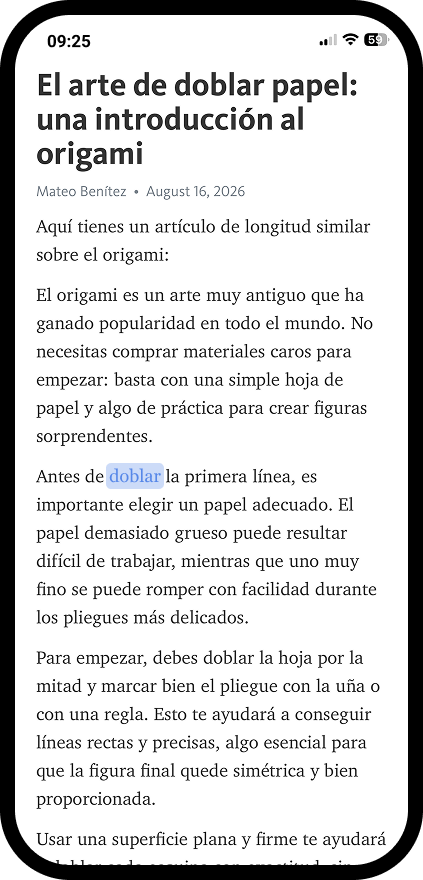
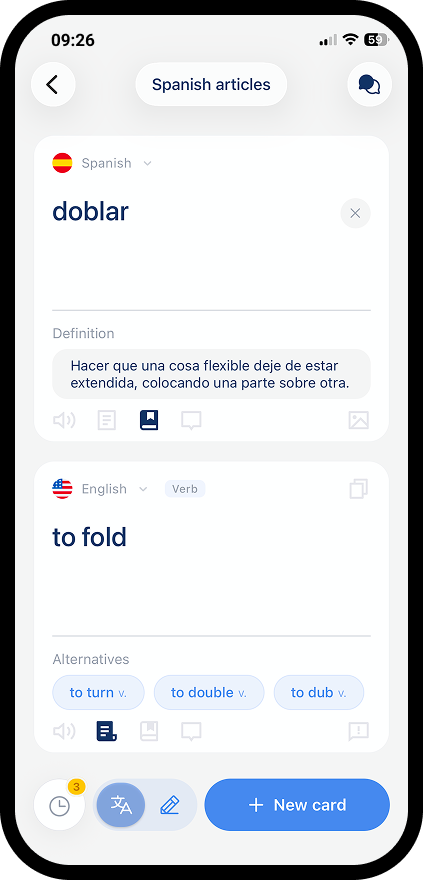
Type it into flangu. You get the translation, and a flashcard is created automatically.
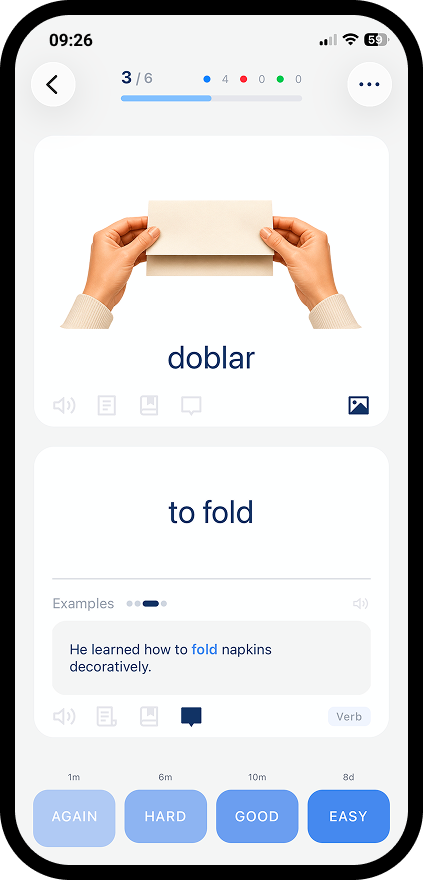
Spaced repetition brings it back at the perfect moment, so it sticks in your memory for good.
Type any word, get an instant translation, and a flashcard is created automatically, ready to review whenever you are.
→ View translation engineGo beyond translation with text-to-speech, pronunciations, alternative translations, synonyms, definitions, real-life examples, and images. Don't just memorize a vocabulary, truly master the language.
→ Explore rich card formattingRecall the word before revealing the answer, then rate how well you remembered it. Your rating helps the algorithm understand what you know and what needs more practice.
→ Read about active recallflangu schedules reviews using FSRS algorithm. It shows you words right before you forget them so you remember more with less effort.
→ Learn how scheduling worksAnalyze your study habits, review activity, and language growth over time. Our rich statistics let you spot patterns, track your streaks, and stay motivated on your journey.
→ Discover analyticsGot a question about a tricky word or phrase? Ask your personal tutor for real-life examples, grammar breakdowns, synonyms, and cultural context.
→ See what you can ask aboutflangu isn’t out yet. Join the waitlist and we’ll email you the moment it’s ready to download.
Not out yet. Launching soon on iOS & Android.
Leave your email and we’ll tell you the moment it launches. One email at launch. No spam, ever.
You’re on the list. We’ll email you at launch.
That didn’t go through. Please check the address and try again.
Choose whether your native or learning language appears on the front or back during review, regardless of the translation direction.
→ Read about review modesThe built-in optimiser uses your review history and learning patterns to fine-tune scheduling around the way you actually learn.
→ How FSRS optimisation worksHear every word spoken by premium neural voices that sound like real native speakers, not robotic text-to-speech.
→ How flashcard audio worksStudy comfortably in the evening or at night with a full dark theme. Use your device system setting or switch between light and dark manually.
→ See the dark themeReview your cards and create new ones manually even without an internet connection. Keep learning when you're travelling, commuting, or offline.
→ What works offlineNo ads, no ad tracking, no data selling. Your learning data is never sold or shared with third parties for marketing.
→ Read our privacy policyflangu is in active development and heading for release on iOS and Android. We haven't locked a public date yet, so the waitlist is the way to hear about it first. Join it and we'll email you the moment the app is downloadable. One email, then nothing else.
→ Join the waitlistflangu supports 30+ languages, and you can pair any of them as your source and target language, not just translating from English. Whether you're a native Spanish speaker learning Japanese or juggling several languages at once, the translator and flashcard generation work the same way in every direction.
→ See the full list of supported languagesflangu works well at every level. Beginners get fully automated flashcards with definitions, examples, and audio that take the guesswork out of building a first vocabulary, while intermediate and advanced learners can lean on richer metadata like synonyms and grammar details to deepen words they already half-know. The FSRS-6 algorithm adapts to your personal recall speed regardless of where you're starting from.
→ Read the getting started guideYes. While the translator is the fastest way to build a deck, you're never locked into it. You can create flashcards manually, write your own definitions and examples, and edit any auto-generated content that doesn't quite fit how you want to learn. flangu's automation is meant to save you time, not take away control over your cards.
→ Learn how to create and edit flashcards manuallyYes. While flangu shines at turning single words into rich, context-filled flashcards, you can also save and study full phrases and sentences the same way: helpful for learning set expressions, grammar patterns, or lines you picked up from a show or book. Everything gets scheduled by the same FSRS-6 algorithm regardless of length.
→ See how phrase and sentence cards workflangu uses AI to translate your text and classify its part of speech, then a second pass generates the definition, synonyms, alternative translations, example sentences, and pronunciation. Common translation pairs share a single cache entry across all flangu users, so results stay consistent and corrections benefit everyone. No automated system is perfect, so if something looks off, you can report it or edit the card yourself.
→ See how flangu generates card contentYes. Once you're signed in and connected to the internet, your decks, review history, and settings sync automatically to the cloud. If you lose your phone or switch devices, simply log back into your account and everything - cards, streaks, and scheduling data - comes right back.
→ Read about account sync and backupsStill have a question?